7-day free trial — early access
Use the Operator to escape the matrix
The matrix is tab-hopping: chat, a board, a generic model. The Operator is the COO in the same teal-and-dark operations OS. It delegates. You stay in consult.
Last updated: September 20, 2026
Talk to the live Operator for seven days. 7-day free trial • Stripe collects a payment method • Cancel before day 8.
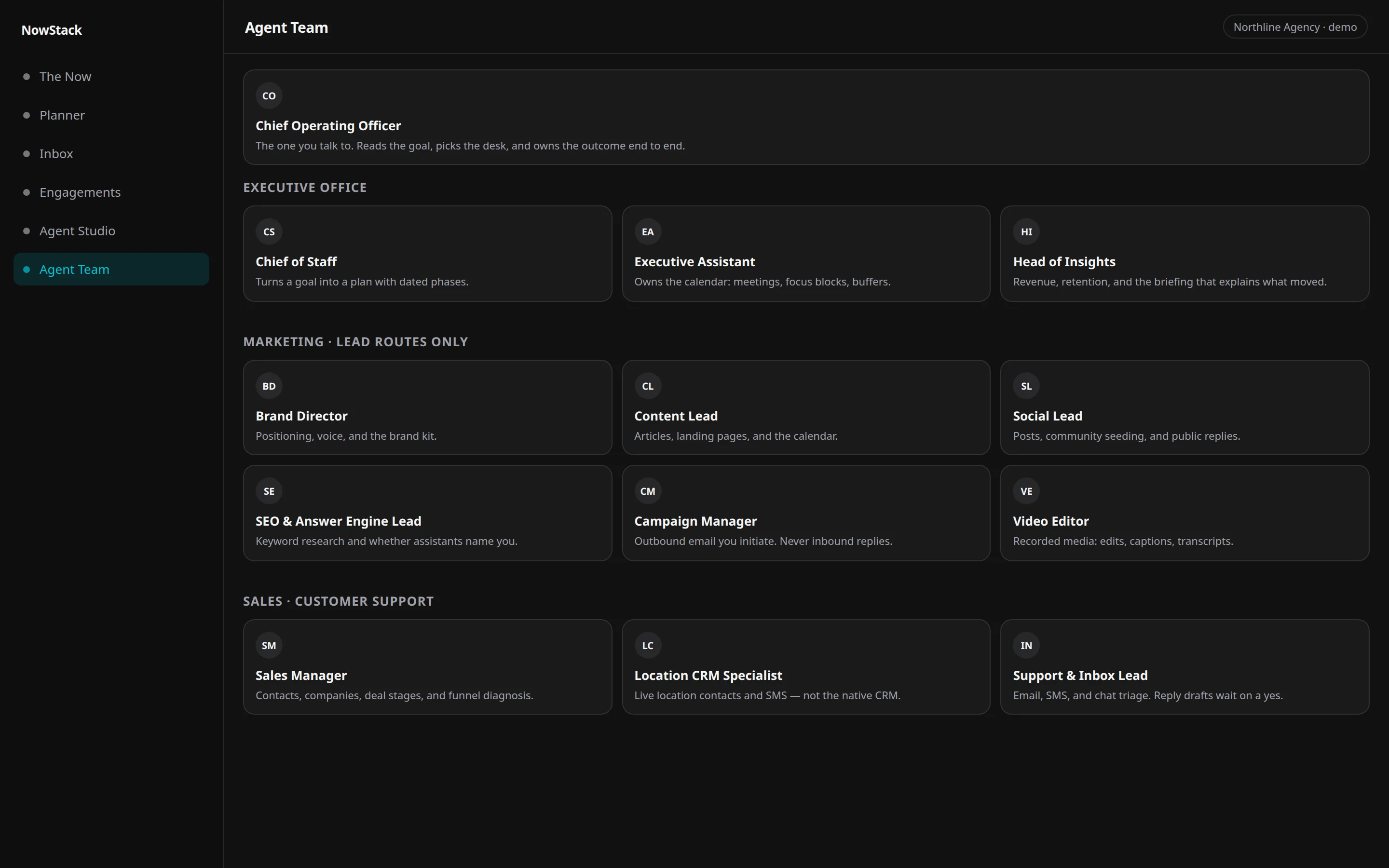
NowStack AI is hub-and-spoke. You talk to one Operator. That Operator routes to specialists. The chrome is the product UI — teal on charcoal, not a neon sidekick and not a cyberpunk skin. Agents draft. People approve in Command Center.
The model freelances. You live in five tabs.
One generic chat treats the company as a prompt. Another tab holds the board. A third holds inbox. The draft that ships is whoever pasted last.
That is the matrix: disconnected tools plus a model that will send if you let it. Escaping it is not a costume. It is one COO, named desks, and a human yes.
The Operator does not wear a trench coat. It sits in the same operations OS as tasks and The Now.
How it works
01
Talk to the COO
The Operator is consultation-only. It decomposes the goal. It does not freelance the company.
02
Specialists draft
Leads route Marketing and Platform. Other desks answer the COO. Work lands as a task artifact, not a chat blob.
03
You approve
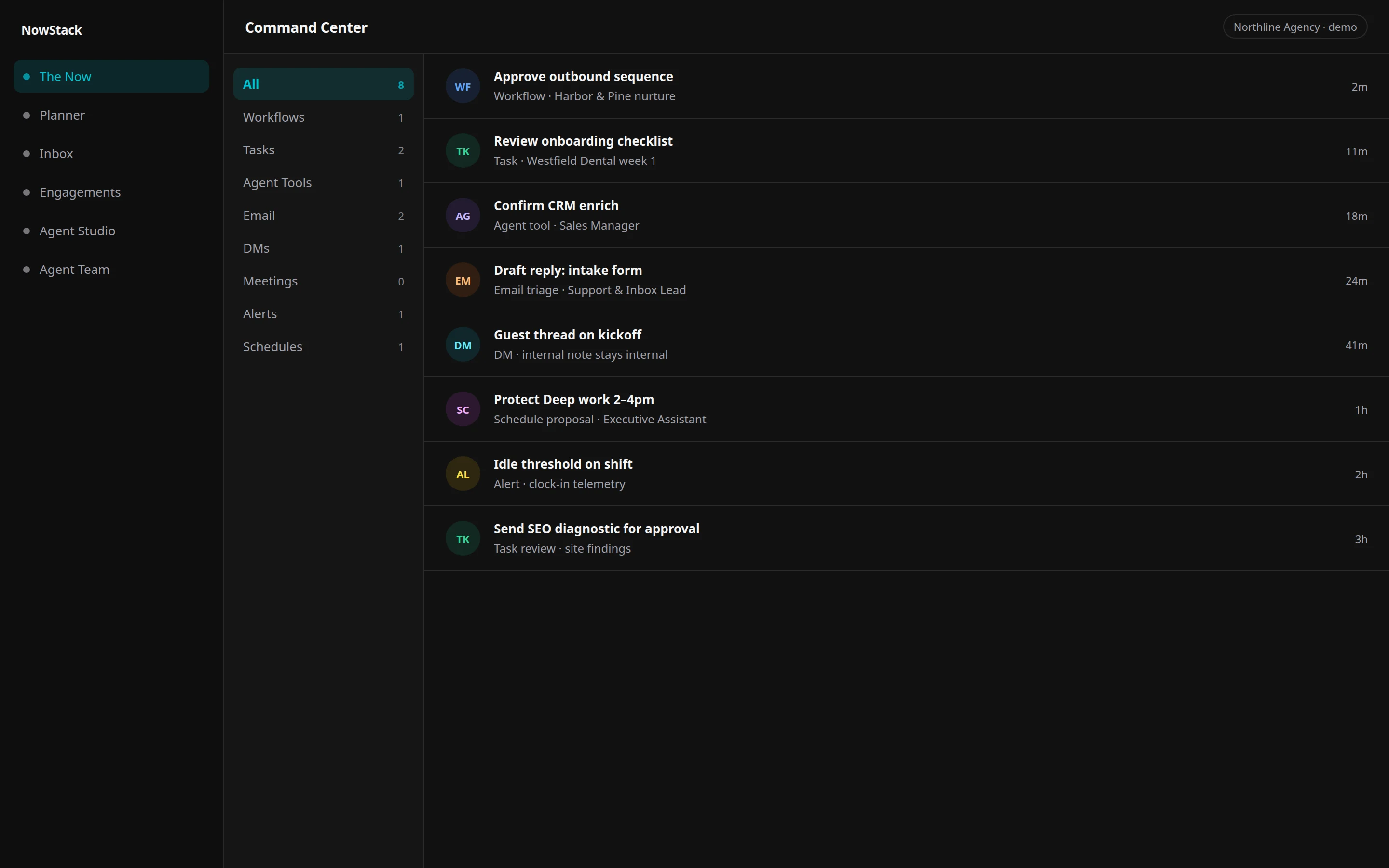
Cards park in Command Center. Agents draft. People approve before anything customer-facing ships.
What does the Operator actually do?
The Operator is the Chief Operating Officer — the one you talk to. It creates tasks, ranks the board, answers methodology questions, and routes craft to a desk. Two leads pick among Marketing and Platform children. Everyone else answers the COO directly.
It does not silently send. Gated tools park as Command Center cards. Approving a Plan card reviews the living task, not a one-paragraph snapshot.
The roster lives on the product team page. Titles come from the same org chart the product uses.
- Consultation-only COO
- Specialists draft on their desks
- Task-as-Artifact is the handoff
- Human yes before customer-facing send
Drafts that heal under stress
When funnels, ads, or social show stress — click-through drop, creative fatigue, CPC up, stage friction — the Operator drafts a heal. The card parks in Command Center (The Now). You approve. The system gets better with you.
Agents draft. People approve. Nothing customer-facing ships on a silent yes.
Stress shows up as a suggested action, not a silent fix. Detect → draft heal → HITL on The Now → learn → softer or auto per skill only after trust graduation and your opt-in.
- Ads: CTR drop, CPC up, frequency fatigue, ROAS slide — draft a heal, do not silently pause spend
- Social: engagement or reach fatigue — draft the next move for The Now
- SEO: rank slide — a suggested action, not an unsupervised rewrite
- Funnel: stage friction — the Operator proposes; a person approves
Teal and dark. Not a costume.
The shots on this page are the product: Operator team and Command Center in the same charcoal canvas and electric-cyan marks as the rest of the OS. That is the visual claim. There is no neon city, no rain-soaked alley, no “AI sidekick” illustration.
Escape the matrix means leave the tab pile. Stay in the operations OS. The Operator routes. You govern.
- Same teal/dark chrome as The Now
- Org chart, not a mascot
- Hub-and-spoke, not freelance chat
- Agents draft. People approve.
How it compares
| Need | NowStack AI | Generic chat | A pile of tabs |
|---|---|---|---|
| Who you talk to | One COO Operator | A model with your paste | Whoever is online |
| Who does the craft | Named specialists | The same chat | Whoever has the file |
| Visual | Teal/dark product UI | A chat skin | Five products |
| Send | Command Center HITL | The send button | Hope |
| Category | Operations OS | A prompt window | Tab-hopping |
Questions
Talk to the Operator on the live OS.
Live workspace: Operator, specialists, Command Center. Stripe Checkout collects a payment method. $0 for 7 days. Cancel before day 8 or Stripe charges the price shown at checkout.