7-day free trial — early access
The OS, not another tab.
NowStack AI puts the work on the task: linked chat, deadlines, duration, and human-in-the-loop cards in Command Center. Run the day from Command Center.
Last updated: September 20, 2026
Run real tasks for seven days. 7-day free trial • Stripe collects a payment method • Cancel before day 8.
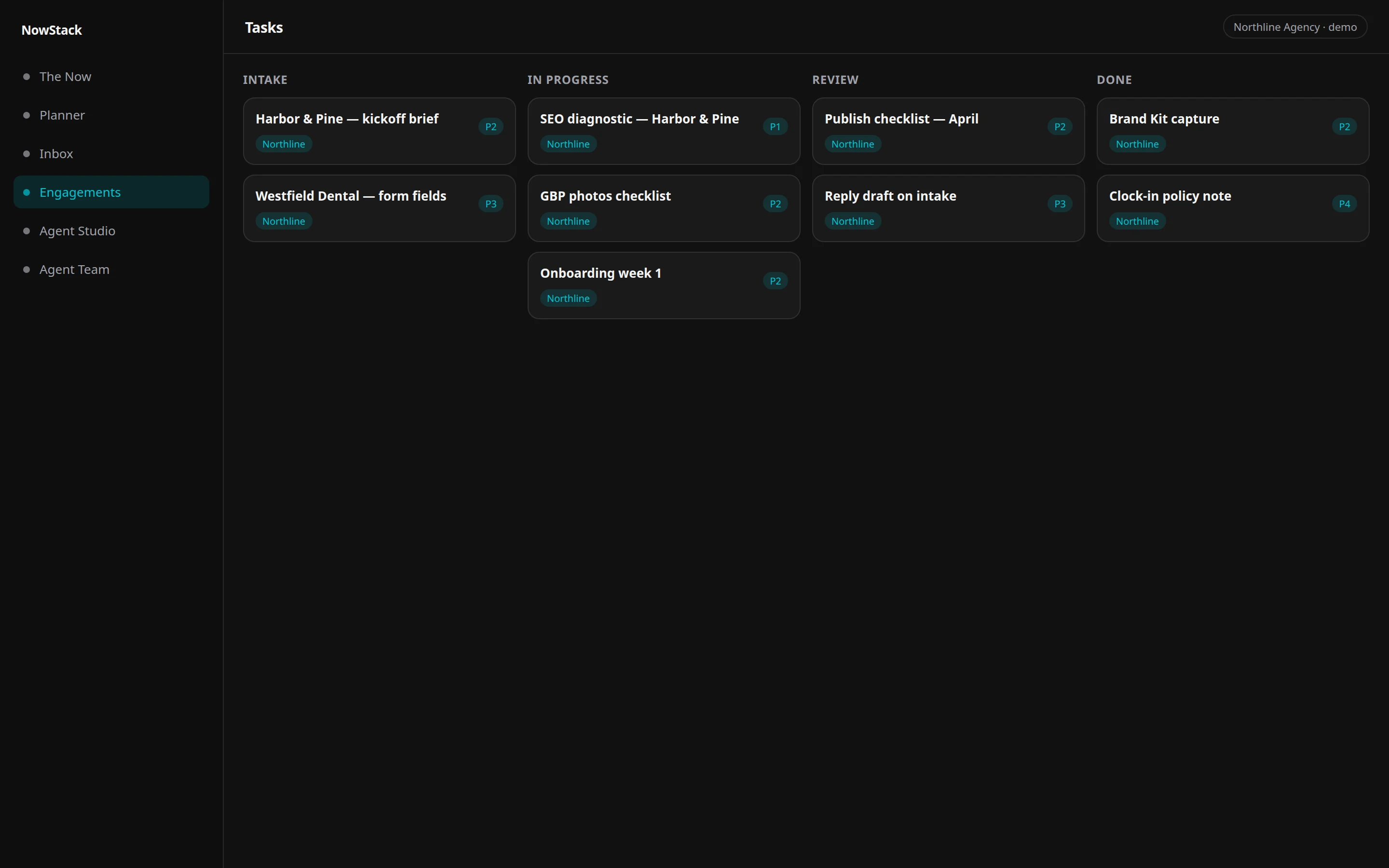
NowStack AI is the operations OS for the workday. Tasks carry linked chat, deadlines, and duration on the same record. Approvals land as cards on The Now. This is the hub, not another tab. Agents draft. People approve before anything customer-facing ships.
The chat is in a channel. The card is on a board. The day is in someone’s head.
A deadline lives on a board. Duration lives in a guess. The real debate lives in a channel you will not find next week. Approvals are emoji. Guest replies and internal notes look the same until they do not.
Another chat tab does not close that loop. Another column tool does not either. You already have chat. You may already have a board. You still reconstruct the morning.
The OS puts conversation, duration, deadline, and the yes on the same record, then surfaces the yes in Command Center.
How it works
01
Put work on a task
Owner, due date, expected duration, pipeline. Table or kanban on the same work.
02
Talk on the task
Task-linked chat stays on the record. Internal notes stay internal. Guest threads stay marked as guest.
03
Govern in Command Center
Send for approval. The card lands in Command Center. Agents draft. People approve.
What is task-linked chat in NowStack?
Every task in NowStack AI can carry its own thread. Comments stay on the work instead of a channel scroll you cannot recover. Internal notes stay internal. Guest-facing replies stay marked as guest. The same conversation can surface in Comms so inbox and task history are not two stories.
This is not “we replaced your chat tool.” Work conversation belongs on the task because that is where duration, deadline, and approval already live.
Open a task. The thread is on the row. Unread work can also show in Comms.
- Chat on the work, not beside it
- Internal vs guest, visually distinct
- Same tenant as inbox and CRM
- History survives the week
How do Command Center HITL cards work with tasks?
Command Center is The Now: workflow approvals, email triage, agent tool confirms, schedule proposals, and alerts in one feed. Send a task for approval and it lands as a card, not a ping in a side channel. Agents draft. People approve. Nothing customer-facing ships on a silent yes.
Approvals are the culture, not a tax. The briefing is the product. You stop reconstructing yes or no from emoji and email.
Stalled work and upcoming deadlines can surface as intelligence next to that feed, so the Operator is not a second board you ignore.
- Send for approval from the task
- Card in Command Center
- Approve, reject with a reason, or edit
- Customer-facing still waits
How do deadlines and duration work on tasks?
Tasks take a due date and an expected duration. Table and kanban sit on the same work. Time can be tracked on the row. The Operator can flag stalled work and upcoming deadlines. That is how the Execute Today loop gets a clock, not a motivational poster.
Priorities (P1–P4), pipelines, subtasks, dependencies, and custom fields exist because client work is messy. The category is still operations OS, not a prettier board.
Connect the work already in flight. Use the hub. If you are choosing between systems, see how the OS compares.
- Due date on the record
- Expected duration, not a shrug
- Timer on the task when you need hours
- Upcoming deadlines as a feed, not a surprise
How it compares
| Need | NowStack AI | Chat | A board |
|---|---|---|---|
| Work record | Task with duration, deadline, owner | A message, then search | A card, chat often elsewhere |
| Conversation | Task-linked chat | Channels, excellent at chat | Comments add-on |
| Approval | Command Center HITL card | Emoji / thread | Status column |
| Agent drafts | Operator plus specialists, then a person | A bot in a channel | An AI field |
| Relationship | The OS. Connect what you still want. | Company chat | Columns if you want them. |
Questions
Run the day on the real OS.
Live workspace: tasks, task-linked chat, Command Center. Stripe Checkout collects a payment method. $0 for 7 days. Cancel before day 8 or Stripe charges the price shown at checkout.